
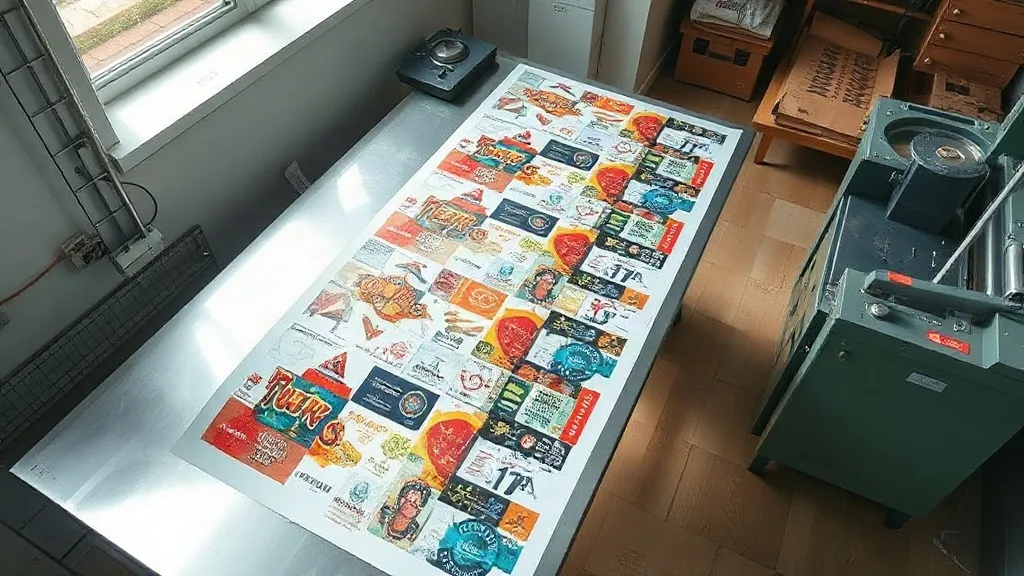
Most print shops lose money in the same quiet place: the empty space between designs. Every time you send a single small graphic to a DTF printer, you pay for the film, the powder, the press time and the operator's attention, and a large share of that expensive real estate sits blank. A DTF Gangsheet solves that problem directly by packing many designs onto one continuous sheet so the printer fills the width instead of the middle. It sounds like a small accounting trick. In practice, it changes how you price jobs, how fast you turn orders around, and how much film ends up in the bin at the end of the week.
This guide walks through how gangsheets actually work in a working shop, where the savings come from, how to build files that print without headaches, and the mistakes that turn a good idea into a pile of misaligned transfers.
What a DTF Gangsheet Really Is
Direct-to-film printing works by jetting white and color inks onto a coated PET film, then dusting the wet ink with hot-melt adhesive powder. The film is cured, and the finished transfer can be pressed onto cotton, polyester, blends, canvas and most other fabrics. The technology is fabric-agnostic, which is why it replaced plastisol and vinyl workflows in so many small shops.
A gangsheet is simply a long roll of that film carrying multiple designs side by side and end to end. Instead of printing one 4-inch logo on a 13-inch-wide sheet, you fill the width and run the sheet several feet long. The printer does one pass, the powder station treats the whole thing at once, and you cut the designs apart afterward. The output is identical to single prints. The economics are not.
Shops typically order gangsheets in two ways. Some print them in-house on a DTF printer and build the layout in RIP software. Others upload a prepared file to a transfer supplier and receive finished, powdered sheets by courier. Both routes use the same layout logic, so the file rules below apply either way.
Where the Savings Actually Come From
It is tempting to describe gangsheets as "half price printing," and that is not accurate. The ink and powder consumed per square inch barely change. What changes is everything around the print.
- Film utilization. A single small design might use 30 percent of the printable width. A well-packed gangsheet pushes utilization past 85 percent, so the film cost per design drops sharply.
- Powder and cure time. The powder station runs on the sheet, not the design. Treating one long sheet takes far less labor than treating fifteen separate short ones.
- Press efficiency. Cutting and stacking a batch of transfers means one organized pressing session instead of fifteen interruptions.
- Setup overhead. Every print job carries a fixed cost in file handling, printer checks and cleanup. Batching designs amortizes that fixed cost across many pieces.
The practical result is that your cost per transfer falls, but your material cost per square inch stays roughly flat. That distinction matters when you set prices. Price from your real per-inch cost plus labor, not from a fantasy number, and the margin holds up.
A quick way to see your own numbers
Take a recent week of single-design prints. Add up the total film area you consumed and divide by the number of usable transfers. Then measure a test gangsheet of the same designs and repeat the calculation. Most shops find the per-transfer film figure drops by a third or more. That gap is your headroom for volume pricing.
Building a Gangsheet File That Prints Cleanly
Layout quality decides whether a gangsheet is a productivity tool or a reprint. The rules are not complicated, but they are unforgiving.
Respect the printable width
Know your printer's true printable area, not the roll width. A 13-inch roll usually gives you closer to 12.5 inches of usable print. Designs that creep into the margin get clipped or trigger a printer error, and you discover it after the film is already coated in powder.
Leave real spacing between designs
Transfers need room to be cut. A common mistake is packing designs so tightly that the cutting blade nicks a neighbor. Leave at least 3 to 5 millimeters of clear space on every side, and more around large solids where the powder tends to spread slightly.
Keep white underbase consistent
Every design on the sheet needs its own white layer beneath the color. If one file arrives without an underbase, it will look washed out on dark garments while the rest of the sheet looks fine. Run a quick visual check on each element before merging the layout.
Group by garment color and size
A gangsheet is most useful when its contents share a destination. Packing all the dark-shirt designs together and all the light-shirt designs on a separate sheet reduces sorting errors and makes pressing sessions predictable. Grouping by size helps too, since small chest logos and large back prints press differently.
Name and mark the file clearly
Once designs are cut apart, the only thing identifying them is your own labeling. Add small reference marks in the margin and keep a keyed list of what is on the sheet. Shops that skip this step spend hours matching loose transfers to orders.
Common Mistakes That Eat the Savings
Experience in a production environment surfaces the same failures again and again.
- Overpacking. Squeezing in one more design to fill a gap often costs more in cutting errors than the extra piece is worth.
- Mixing incompatible fabrics in one batch. A transfer destined for nylon needs different press settings than one for cotton. If they are on the same sheet, the operator has to separate them anyway, which defeats the batching benefit.
- Ignoring resolution limits. Scaling a small raster logo up to fill space produces a blurry print. Vector files or high-resolution exports only.
- Forgetting the cut line. Designs with gradients or soft edges need a defined boundary. Without one, the cutter guesses and the transfer looks ragged.
- Storing sheets badly. Finished transfers should be rolled, not folded, and kept away from heat and moisture. Creased film presses creases into the garment.
When a Gangsheet Is the Wrong Choice
Batching is not always better. If you have a single large back print that already spans the full width, there is nothing to gain. If a client needs one urgent sample before a bulk run, a quick single print is faster than building a layout. And if you are still dialing in color profiles on a new printer, run individual tests first so a bad setting does not ruin an entire sheet.
The honest rule: batch when designs are small to medium, share a fabric and color destination, and can wait for a combined run. Print solo when speed, testing or size makes batching pointless.
Frequently Asked Questions
How long can a DTF gangsheet be?
Length depends on the printer and the RIP software, but most desktop DTF setups handle sheets from about 12 inches up to several feet, and industrial roll machines go considerably longer. Longer sheets lower your per-design cost but raise the risk if something goes wrong mid-print, so many shops settle on a length they can finish and cut in one sitting.
Can I mix different garments on one gangsheet?
You can print them together, but you should not press them together. Cotton, polyester and blends need different temperatures and dwell times, and polyester can show dye migration under aggressive heat. Group designs by the fabric they will land on so the pressing stage stays simple.
Do gangsheets work for very small logos?
Yes, and this is where they shine. Small chest logos, sleeve prints and tagless labels waste the most film when printed alone, so packing dozens onto one sheet produces the biggest relative savings. Just keep spacing generous enough that the cutter has room to work.
What file format should I send for a gangsheet?
Vector formats such as PDF, AI or EPS are safest because they scale without quality loss. High-resolution PNG files at 300 DPI also work if they are already at final print size. Always confirm the printable width and required bleed with your supplier or check your own printer's specification before laying out the sheet.
How do I price gangsheet transfers to customers?
Start from your measured cost per square inch of film, ink and powder, then add labor for layout, cutting and pressing. Divide by the number of usable transfers on the sheet to get a unit cost, and build your retail price from that. Shops that price from guesswork usually discover the margin problem months later.
Making It Part of Your Weekly Routine
The shops that get the most from batching treat it as a scheduled activity rather than an emergency measure. They collect small orders through the week, build one or two combined layouts on a fixed day, print and powder in a single session, then cut and sort against a printed key. The workflow is calmer, the film bill is lower, and the reprint rate drops because each sheet is checked once instead of every job being handled in isolation.
Start small. Take your five most common small designs, lay them out on one sheet, and compare the real cost against the same five printed solo. The number you get will tell you more than any general advice, and it will show you exactly where your own production has room to tighten.